> ## Documentation Index
> Fetch the complete documentation index at: https://auth0-docs-applications-ia-reorg.mintlify.site/llms.txt
> Use this file to discover all available pages before exploring further.
# Confidential and Public Applications
> Learn the difference between confidential and public applications and how it relates to your Auth0 application settings.
According to the [OAuth 2.0 specification](https://tools.ietf.org/html/rfc6749#section-2.1), an application is classified as either confidential or public depending on its authentication capability (whether it can hold a secret).
## Confidential applications
Confidential applications can hold credentials in a secure way without exposing them to unauthorized parties. They require a trusted backend server to store the secret(s).
### Grant types
Confidential applications use a trusted backend server and can use grant types that require specifying their Client ID and Client Secret (or alternative registered credentials) for authentication when calling the Auth0 Authentication API [Get Token](https://auth0.com/docs/api/authentication#get-token) endpoint. Confidential applications can use Client Secret Post, Client Secret Basic, or [Private Key JWT](/docs/get-started/authentication-and-authorization-flow/authenticate-with-private-key-jwt) authentication methods.
These are considered confidential applications:
* A web application with a secure backend that uses the [Authorization Code Flow](/docs/get-started/authentication-and-authorization-flow/authorization-code-flow), [Resource Owner Password Flow](/docs/get-started/authentication-and-authorization-flow/resource-owner-password-flow), or Resource Owner Password Flow with realm support
* A machine-to-machine (M2M) application that uses the [Client Credentials Flow](/docs/get-started/authentication-and-authorization-flow/client-credentials-flow)
### ID tokens
Because confidential applications are capable of holding secrets, you can have ID tokens issued to them that have signed in one of two ways:
* Symmetrically, using their client secret (`HS256`)
* Asymmetrically, using a private key (`RS256`)
## Public applications
Public applications **cannot** hold credentials securely.
### Grant types
Public applications can only use grant types that do not require the use of their client secret. They can't send a client secret because they can't maintain the confidentiality of the credentials required.
These are public applications:
* A native desktop or mobile application that uses the [Authorization Code Flow with PKCE](/docs/get-started/authentication-and-authorization-flow/authorization-code-flow-with-pkce)
* A JavaScript-based client-side web application (such as a single-page app) that uses the [Implicit Flow](/docs/get-started/authentication-and-authorization-flow/implicit-flow-with-form-post) grant
### ID tokens
Because public applications are unable to hold secrets, [ID tokens](/docs/secure/tokens/id-tokens) issued to them must be:
* Signed asymmetrically using a private key (`RS256`)
* Verified using the public key corresponding to the private key used to sign the token
## How Auth0 determines credential security
Auth0 determines if an application is confidential or public based on the application type and, if available, the application's **Authentication Method** setting, which defines how the application authenticates against the Auth0 Authentication API [Get Token endpoint](https://auth0.com/docs/api/authentication/authorization-code-flow/get-token):
* Regular web apps and machine-to-machine apps are confidential unless you configure them to have no authentication method.
* Single-page apps and native apps are public.
These application types cannot maintain the confidentiality of the credentials required for Token endpoint authentication methods, so the Auth0 Dashboard does not include authentication method or credentials settings for these application types.
These values map to confidential and public applications as follows:
| Application type | Example | Token endpoint authentication method |
| ---------------- | --------------------------------- | --------------------------------------------------------- |
| **Public** | Single-page or native | **None** |
| **Confidential** | Regular web or machine-to-machine | **Basic**, **Post**, **Private Key JWT**, **Unspecified** |
## Check and manage the authentication method
You can check whether an application is registered with Auth0 as a confidential or public application in the Auth0 Dashboard. From [Applications > Applications](https://manage.auth0.com/#/applications), select the name of the application to view.
* If the **Credentials** tab is not available, the application is a public application.
* If the **Credentials** tab is available, the application is a confidential application.
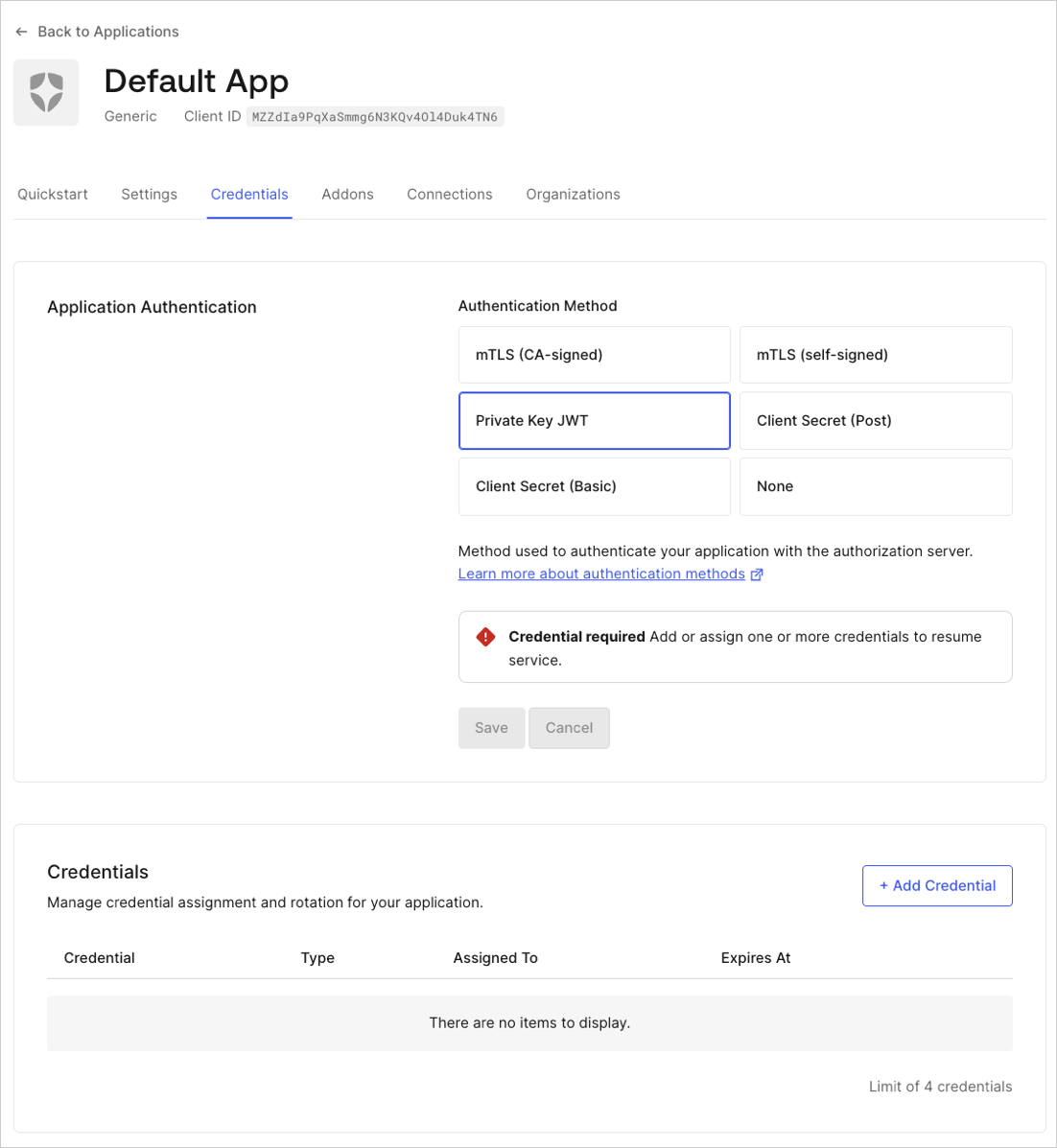 From the **Credentials** tab, you can manage the application's authentication method:
* **None**: Public application without a client secret.
* **Client Secret Post**: Application using POST request body parameters to send a client secret.
* **Client Secret Basic**: Application using the HTTP BASIC authentication scheme to send a client secret.
* **Private Key JWT**: Application using asymmetric authentication.
To learn more, read [Application Credentials](/docs/secure/application-credentials).
From the **Credentials** tab, you can manage the application's authentication method:
* **None**: Public application without a client secret.
* **Client Secret Post**: Application using POST request body parameters to send a client secret.
* **Client Secret Basic**: Application using the HTTP BASIC authentication scheme to send a client secret.
* **Private Key JWT**: Application using asymmetric authentication.
To learn more, read [Application Credentials](/docs/secure/application-credentials).